• 3 min read
Xteink’s X4 Pro fixes a lot — but not enough
Xteink’s $99 X4 Pro adds a touchscreen and front light, making its tiny e-reader far easier to live with — especially with CrossPoint Reader support at launch.
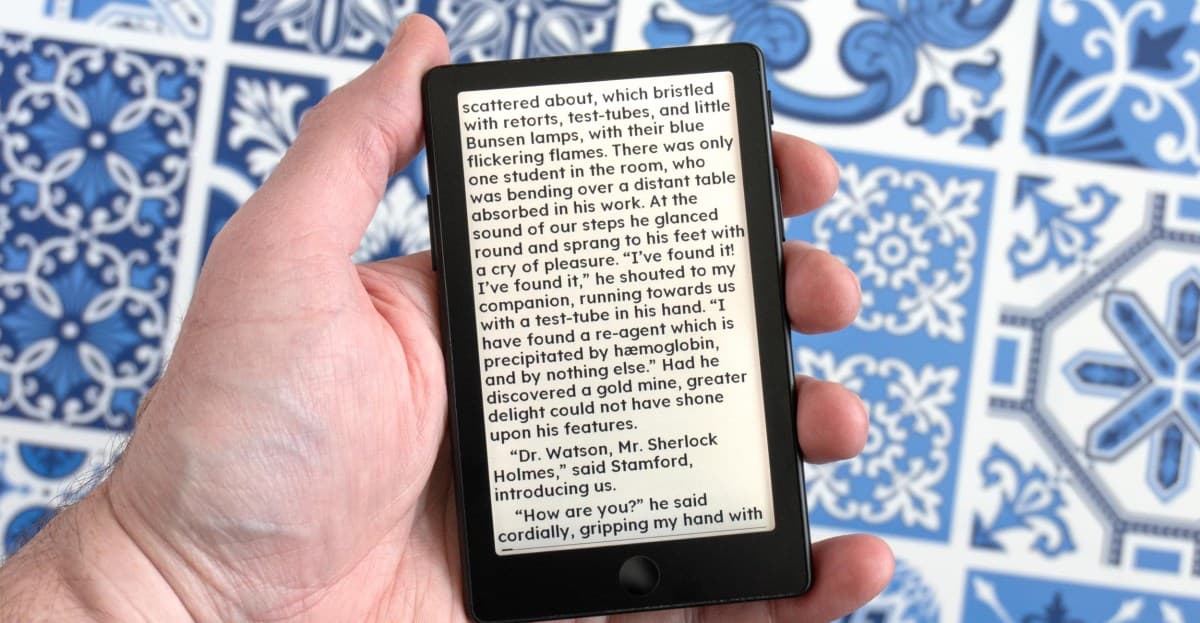
Image: The Verge
Xteink’s new X4 Pro is the company’s strongest tiny e-reader yet, and also its most expensive at $99. The big upgrades are a touchscreen and a built-in screen light, two changes that make it feel much less like a novelty and more like a real alternative for readers who want something far smaller than a Kindle or Kobo.
The 4.26-inch, 800 x 480 E Ink display keeps the X4 Pro extremely pocketable. It’s slightly smaller and thinner than the original X4, while still sitting well below the size of Amazon’s 6-inch Kindle. That said, it lands uncomfortably close to the $110 entry-level Kindle on price, while lacking Amazon’s polished software and built-in bookstore.
To get that thinner design, Xteink dropped a physical USB-C port. The X4 Pro uses a magnetic pogo-pin connector on the back instead, with a USB-C adapter included. It works, but it also means carrying a proprietary adapter you really do not want to lose.
The back also still has magnets so the reader can attach to compatible phones like a wireless battery pack.

Recommended reading
Pulsar’s $180 mouse puts a Noctua fan on your hand
According to The Verge, the magnets are stronger than on earlier models, but still not strong enough to feel trustworthy in a pocket. On an iPhone 16 Pro, the reader also hangs off the bottom by roughly half an inch. The attachment feature remains more gimmick than selling point.
Touchscreen, buttons, and front light
The touchscreen is the most meaningful hardware change. Xteink still keeps four buttons: two page-turn buttons, a reset button, and a power / sleep button.
There’s also a microSD card slot for storage expansion, and a new touch-sensitive home button below the display.
The Verge says touch navigation makes the device much easier to use than older Xteink readers, which relied heavily on buttons. But the screen still doesn’t feel as responsive as a Kindle or Kobo, and taps sometimes need to be repeated with more pressure.
The new front light is another major upgrade.
It’s a bit uneven and brighter at the top of the display, but users can manually adjust brightness and color temperature from a swipe-down menu. There’s no automatic adjustment or scheduling yet, though reading in bed without a lamp is a clear improvement over earlier Xteink models.
CrossPoint Reader may be the real reason to buy it
Xteink has improved its own software, simplifying menus and making touch controls more logical.
Still, the bundled experience remains rough. Out of the box, users are limited to a single font in two sizes unless they go through extra steps to install their own.
That’s why CrossPoint Reader matters so much. The free alternative firmware, which The Verge calls a major upgrade to the UI and reading experience, is expected to support the X4 Pro at launch. Justin Mitchell, now the core maintainer, told The Verge support will be available “before any customers are able to order and receive theirs in the states.” CrossPoint Reader is now part of Mitchell’s Free Ink project, which includes Xteink as a hardware partner.
For buyers who care most about portability, that may be enough. Even with a proprietary charging connector and software issues, the X4 Pro looks like the best tiny e-reader Xteink has made so far.

Computing Editor
Tomas lives in the terminal. He covers chips, laptops, and operating systems with a focus on performance and efficiency. He reads kernel changelogs the way other people read fiction, and he's always on the hunt for the perfect mechanical keyboard switch. If it processes data, Tomas has an opinion on it.
via The Verge