• 2 min read
AirPods public beta adds custom EQ at last
Apple’s latest AirPods public beta brings custom EQ to H2-based models, with basic controls for lows, mids, and highs.
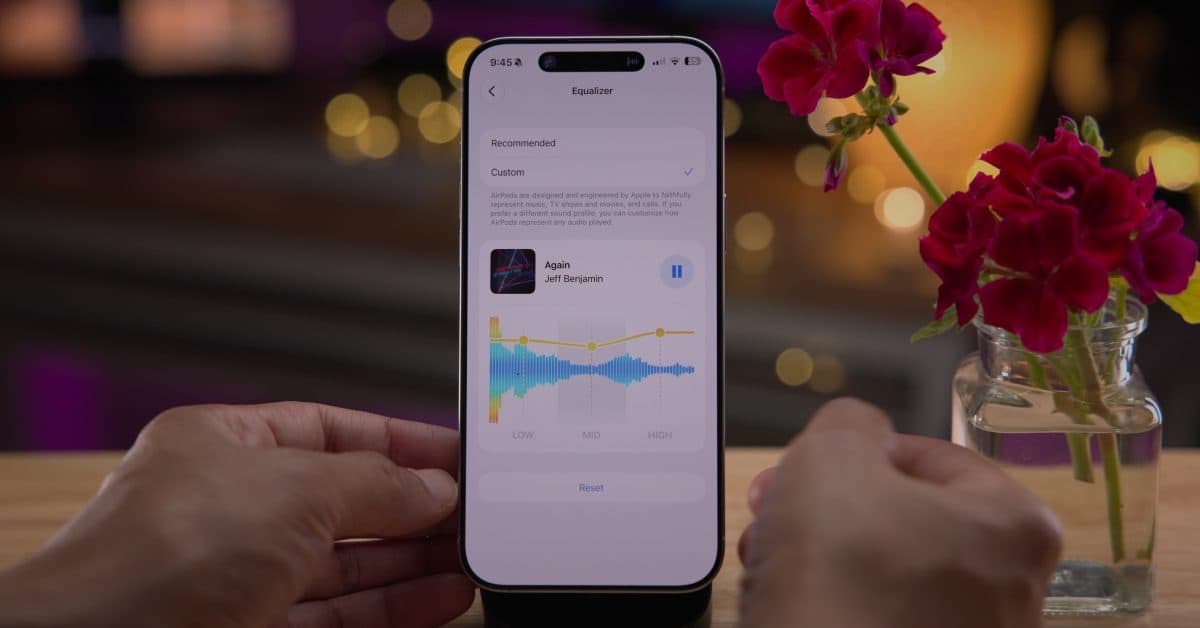
Image: 9to5Mac
Apple quietly shipped a new AirPods public beta alongside the iOS 27 public beta, and it includes a feature users have wanted for years: custom EQ. The firmware is version 9.0.314 with build 9A314b.
The beta is available for:
- AirPods Pro 3
- AirPods Pro 2 (Lightning and USB-C)
- AirPods 4
- AirPods 4 with Active Noise Cancellation
- AirPods Max 2
Users can enable it from the Settings app on iPhone when their AirPods are connected. Apple says beta firmware will download and install when the earbuds or headphones are in their charging case and within range of the paired iPhone.
The headline addition is a three-band equalizer in the AirPods settings, letting users adjust lows, mids, and highs. The control sits under Audio and Routing, and Apple also lets users play a song from Apple Music in the Settings app while changing the EQ so they can hear the difference in real time.

Recommended reading
Noise-canceling earbuds surge on AliExpress in Russia
“AirPods are designed and engineered by Apple to faithfully represent music, TV shows and movies, and calls. If you prefer a different sound profile, you can customize how AirPods represent any audio played.”
It’s not a pro-grade EQ system, but it does give AirPods owners more direct control over sound. According to the source, the feature is available on all AirPods with an H2 chip, including AirPods Pro 2, AirPods Pro 3, AirPods 4, and AirPods Max 2.
The same iOS 27 cycle also adds several other AirPods features:
- A redesigned Settings interface with separate menus for Hearing Health, Find My, Live Translation, and more
- A new Adaptive Audio slider for finer control
- GymKit support on iPhone and AirPods Pro 3, where it previously required an Apple Watch
- Precision Finding in the Find My app on Apple Watch for AirPods Pro 3
- Siri AI support when paired with a compatible iPhone
To join the beta, go to Settings > Bluetooth, tap the (i) next to your AirPods, then enable AirPods Beta Updates.

Gadgets Editor
Eli is obsessed with the tangible future. He reviews phones, wearables, and everything with a battery. Known for his rigorous testing protocols and unabashed teardowns, Eli has broken more review units than he cares to admit, all in the name of discovering the truth about durability and repairability.
via 9to5Mac