• 2 min read
Two free AI upscalers worth using
Upscayl and Waifu2x are free image upscalers that handle different jobs best: photos for one, illustrations and pixel art for the other.
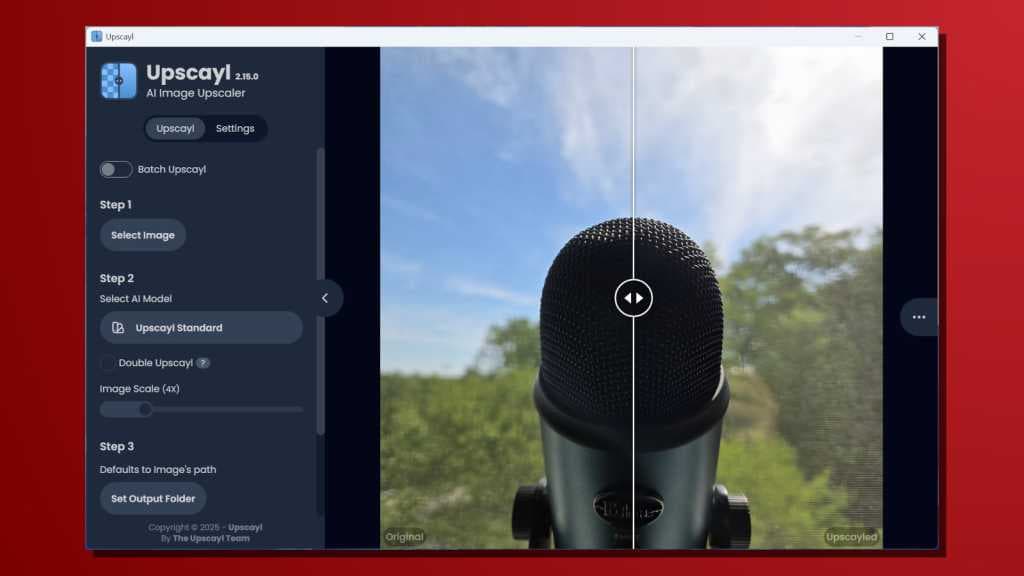
Image: PCWorld
If you have an old photo, a tiny screenshot, or a heavily compressed image that looks too soft, a free image upscaler can often help. PCWorld highlights two favorites: Upscayl and Waifu2x.
Upscayl is a free, open-source desktop app for Windows, macOS, and Linux that runs locally on your computer. That means no watermarks, no upload limits, and your images stay private. You can drop in an image, choose an AI model, and upscale it by 2x, 4x, or more.
According to PCWorld, Upscayl works especially well on real-world photos such as old family pictures, compressed web images, and low-resolution wallpapers. It tends to sharpen edges and rebuild detail by generating realistic textures and fine details, though very blurry images can still end up looking artificial.
Waifu2x, despite the name, is not limited to anime. PCWorld says it started out trained on anime images but has become one of the better free tools for upscaling illustrations while also reducing image noise. It performs best on images with clean lines, including:
- anime
- manga
- digital art
- game sprites
- pixel art
On those kinds of images, Waifu2x often preserves crisp edges better than more general-purpose upscalers. It also offers adjustable noise reduction, which can help clean up heavily compressed files before enlarging them.
Recommended reading
Flipper Busy Bar Is Pricey but Helps You Focus
PCWorld’s recommendation is straightforward: start with Upscayl for photos, and use Waifu2x for artwork or retro game graphics.

Computing Editor
Tomas lives in the terminal. He covers chips, laptops, and operating systems with a focus on performance and efficiency. He reads kernel changelogs the way other people read fiction, and he's always on the hunt for the perfect mechanical keyboard switch. If it processes data, Tomas has an opinion on it.
via PCWorld