• 2 min read
iOS 27 adds a manual iPhone recovery screen
Apple now lets iPhone and iPad users manually boot into a new recovery screen in iOS 27 beta, with update, diagnostics, erase, and restore options.
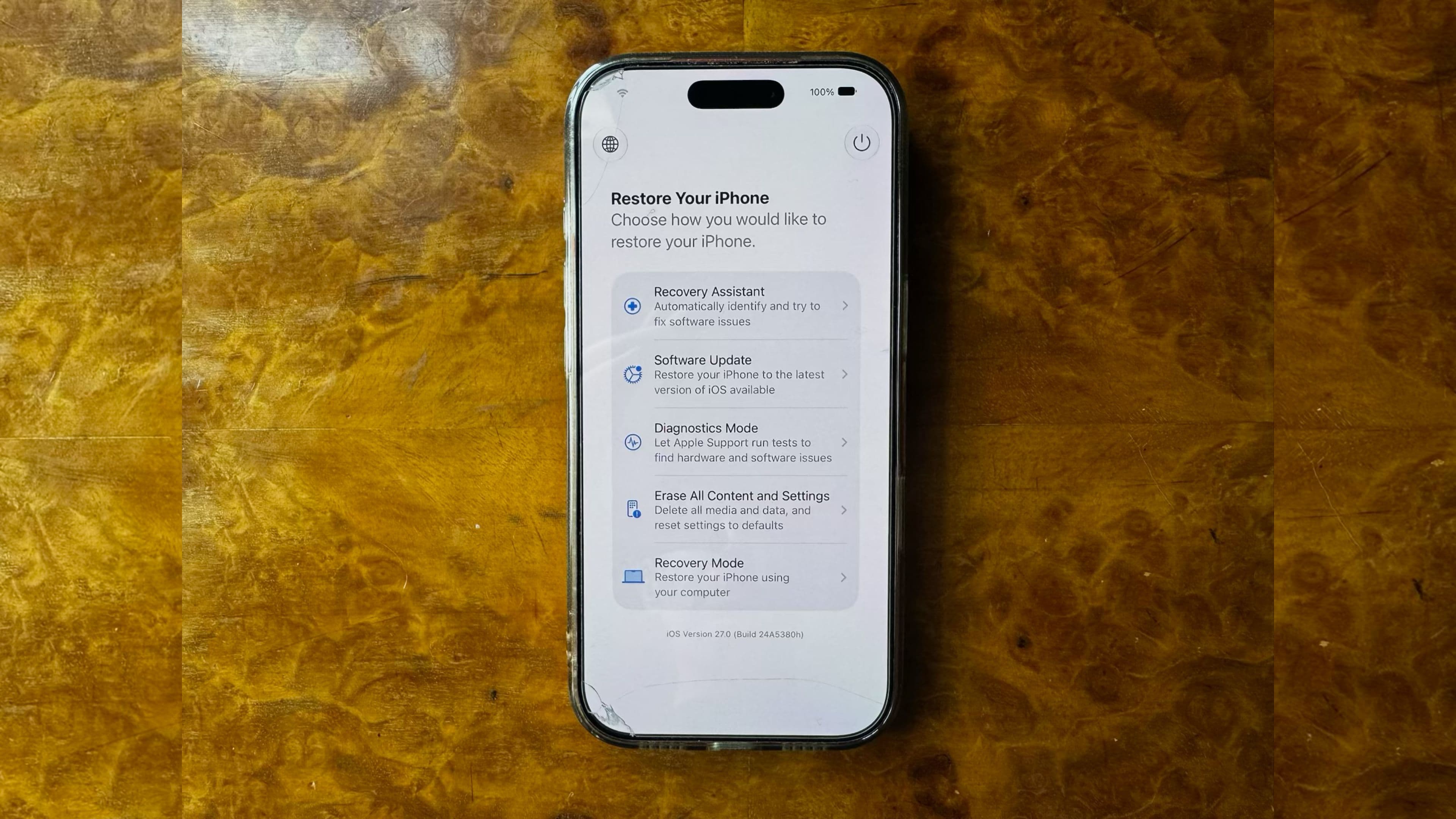
Image: MacRumors
Apple has expanded the Recovery Assistant introduced in iOS 26. In iOS 27, currently in beta, you can now manually boot an iPhone into a new Mac-style recovery screen instead of waiting for the device to fail at startup and enter recovery on its own.
The new mode lets users troubleshoot, update, or erase an iPhone without necessarily connecting it to a Mac or PC. It can automatically join a known Wi‑Fi network, and it shows the device’s battery percentage in the corner of the screen. According to MacRumors, the same process also works on iPads running iPadOS 27.
To access it:
- Turn off the iPhone and wait about a minute.
- Press and hold the Side button.
- Keep holding when the Apple logo appears.
- Release when “Loading recovery options…” appears.
At that point, the iPhone boots into the new recovery interface instead of loading iOS.
The recovery screen includes five options:

Recommended reading
Infinix Note 60 Pro adds two metallic finishes
- Recovery Assistant for automatic software issue scanning and repair attempts
- Software Update to install the latest available iOS version
- Diagnostics Mode to check for hardware and software issues
- Erase All Content and Settings to wipe the device
- Recovery Mode to enter the traditional restore mode used with a Mac or PC
MacRumors also notes a sixth hidden option on newer iPhone models. From the recovery screen, pressing and holding the Side button again brings up Nearby Device Recovery, which lets users restore the iPhone with another nearby Apple device. The site says this is similar to a recovery feature that debuted on iPhone 16 models.
To exit the recovery screen, tap the power button in the top-right corner and confirm a restart, or press and hold the Side button and choose Restart or Shut Down. With iOS 27 now in public beta ahead of its fall release, the feature could be useful if a beta install or failed update leaves an iPhone unusable.

Gadgets Editor
Eli is obsessed with the tangible future. He reviews phones, wearables, and everything with a battery. Known for his rigorous testing protocols and unabashed teardowns, Eli has broken more review units than he cares to admit, all in the name of discovering the truth about durability and repairability.
via MacRumors