• 3 min read
Lenovo’s X1 Carbon gets easier to fix
The ThinkPad X1 Carbon Gen 14 keeps its classic design but adds a more repairable internal layout, with little performance gain over last year.
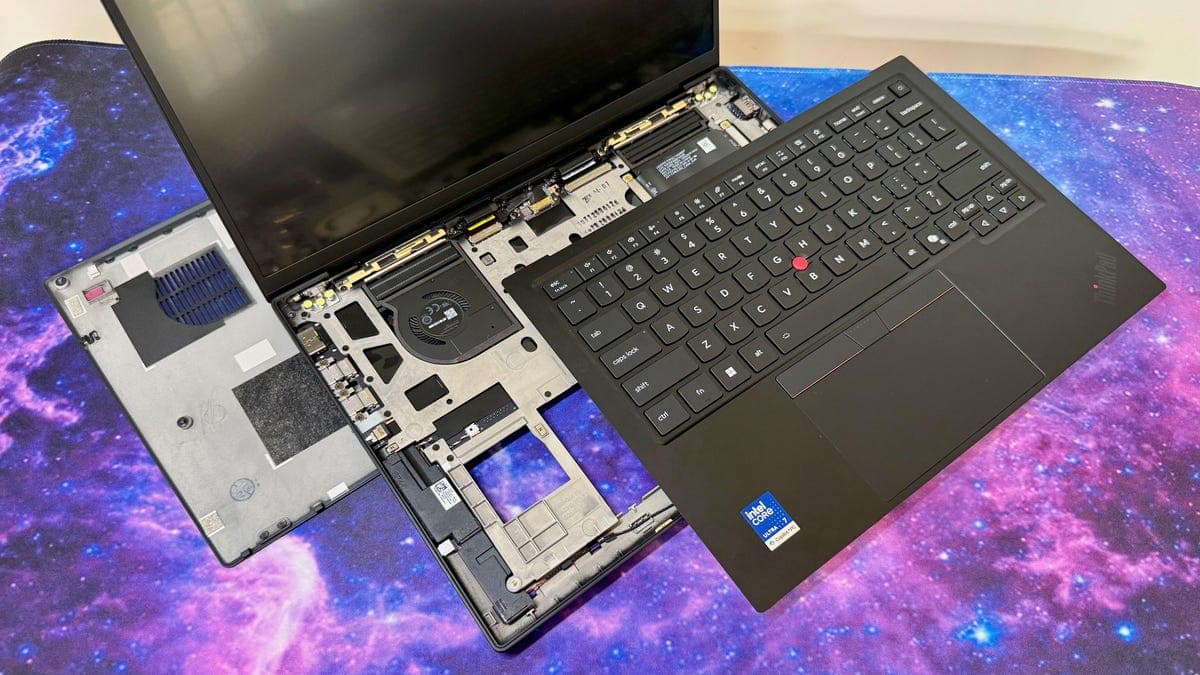
Image: CNET
Lenovo’s ThinkPad X1 Carbon Gen 14 changes very little on the outside, but inside it has been heavily reworked to make repairs easier. CNET gave the laptop an 8.3/10, arguing that the real reason to buy this year’s model is not speed, but a new Space Frame chassis that improves serviceability and extends the machine’s usable life.
The 14-inch business ultraportable runs on Intel Core Ultra 300 series chips, including the Core Ultra 7 355 in CNET’s review unit, paired with 32GB LPDDR5-7467 RAM and a 512GB SSD. That configuration costs $2,374 and includes a 2,880x1,800, 120Hz OLED display. According to CNET, it is actually $100 cheaper than a similar Gen 13 setup from last year because Lenovo no longer charges extra for the OLED panel.
The starting price is $2,139 in the US, £2,366 in the UK and AU$3,779 in Australia. A lower-priced configuration can be brought down to $1,884 by choosing a Core Ultra 7 355 and 16GB of RAM. Lenovo also now offers up to 64GB of memory, but only with the Core Ultra 7 365, and that upgrade costs $720.
What changed in the Space Frame design
The big shift is repairability. CNET says users can remove the bottom panel with four Phillips screws, then access more of the internals by removing the battery and keyboard deck, for a total of 13 screws to reach the major components. The battery, cooling fans, keyboard, speakers and several ports are replaceable. The SSD is also replaceable, though there is only one M.2 slot, and the RAM is not user-replaceable.
Recommended reading
PsiQuantum bets on light for a 100-cabinet quantum computer
CNET notes the process is still more complex than on a Framework laptop because of four ribbon cables and a somewhat fiddly reassembly process. Even so, it calls the Gen 14 “much more repairable than any previous ThinkPad.”
Performance and battery life
That added serviceability comes with little performance upside. CNET says the Panther Lake-based Gen 14 is no faster than last year’s Lunar Lake model in any meaningful way. Multicore results rose slightly, but single-core and graphics performance slipped. One reason is that the Core Ultra 7 355 has four Xe graphics cores, versus eight Xe cores on the previous Core Ultra 7 258V.
Battery life also fell. In CNET’s YouTube streaming battery drain test, the ThinkPad X1 Carbon Gen 13 lasted nearly 18 hours, while the Gen 14 lasted almost 15 hours. That is still enough for most workdays, but it is a notable step back.
The rest of the package remains familiar: a 2.16-pound (0.98 kg) chassis, the classic ThinkPad look, a highly rated keyboard, Windows Hello webcam support, a fingerprint reader integrated into the power button, and a port selection that now includes three USB-C Thunderbolt 4 ports, plus USB-A 5Gbps, HDMI 2.1 and a combo audio jack. For buyers who care about longevity more than raw speed, that repair-friendly redesign is the headline feature.

Computing Editor
Tomas lives in the terminal. He covers chips, laptops, and operating systems with a focus on performance and efficiency. He reads kernel changelogs the way other people read fiction, and he's always on the hunt for the perfect mechanical keyboard switch. If it processes data, Tomas has an opinion on it.
via CNET