• 2 min read
VariAlarm adds schedule-based alarms to iPhone
If your alarm app looks like a graveyard of half-broken wake-up plans, VariAlarm is trying to clean it up. The new iPhone app adds schedule-based alarms, swapping fixed alarm times for routines that change with your day,
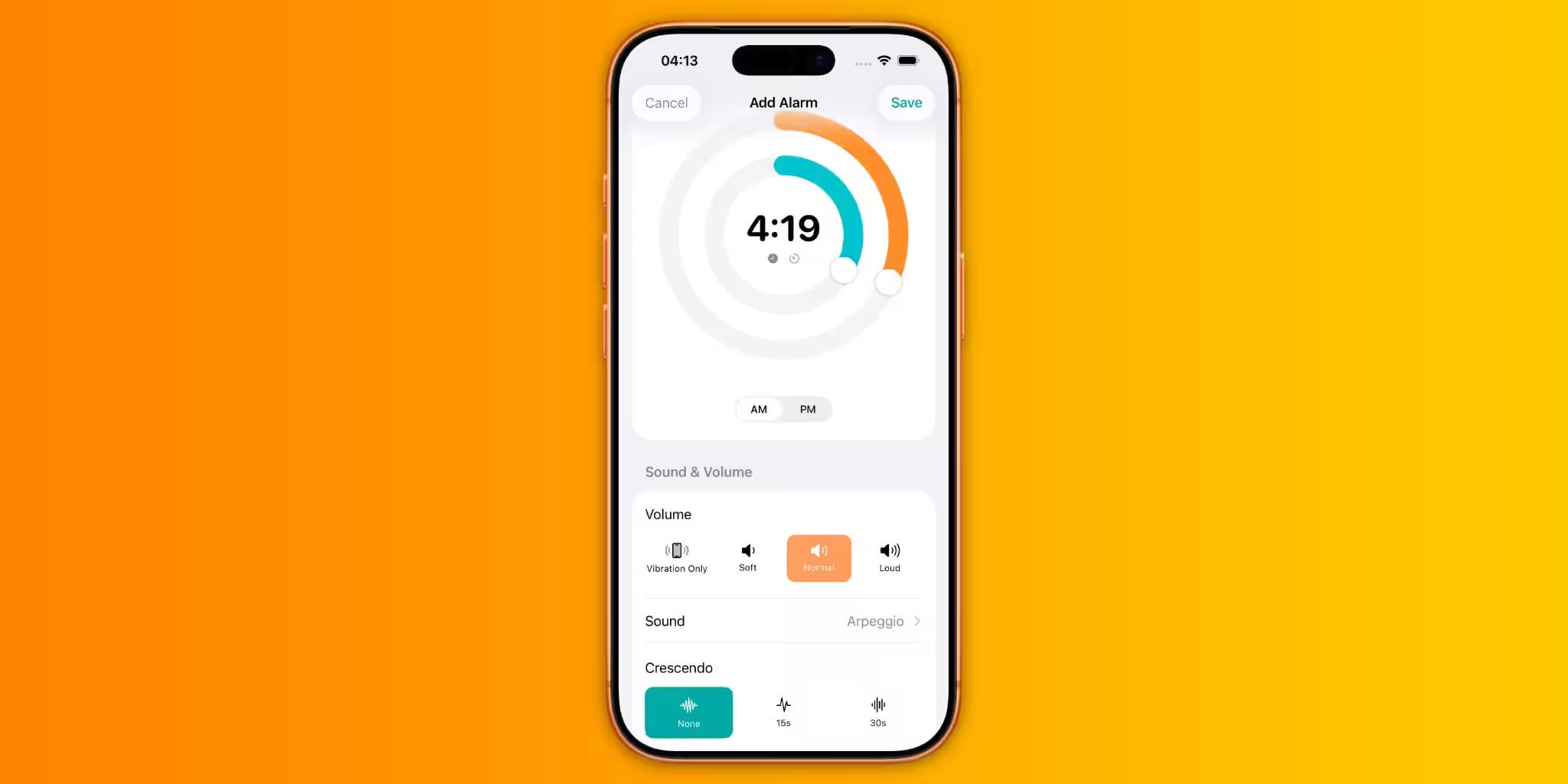
Image: 9to5Mac
If your alarm app looks like a graveyard of half-broken wake-up plans, VariAlarm is trying to clean it up. The new iPhone app adds schedule-based alarms, swapping fixed alarm times for routines that change with your day, so a gym morning, a workday, and a meeting-heavy calendar can each trigger a different wake-up plan without nightly tap-hunting.
That idea sounds almost embarrassingly overdue. Apple’s Clock app still treats alarms as static entries, which is fine until your routine stops being static. Third-party alarm apps have tried to be smarter before, but most stop at recurring rules; VariAlarm leans harder into the calendar-driven life many people actually live.
How VariAlarm schedule-based alarms work
Instead of building a long list of separate alarms, VariAlarm lets you create templates. The example the developer gives is simple: a gym day might start with a 5:45 am alarm and a 6 am follow-up nudge, while a workday could shift to a 7 am wake-up. If your morning meeting moves, the alarms move too, thanks to Apple Calendar syncing.
The app also uses the new alarms API in iOS 26, which should help it feel less like a clever workaround and more like something Apple might have shipped itself. You can adjust alarm volume and duration, and there are lock screen widgets for quick visibility. In other words: less alarm clutter, more automation, and a small mercy for anyone who has ever deleted the wrong alarm before bed.

Recommended reading
Galaxy Z Fold 8 Ultra may get a bigger battery
VariAlarm price and availability
VariAlarm is free on the App Store for iPhone users running iOS 26 and later. The Pro subscription adds extra templates, automations, and scheduling for $1.99/month or $14.99/year, with a 7-day free trial. For a limited time, there’s also a lifetime purchase for $14.99 once, which is the sort of pricing that makes monthly subscriptions look a little awkward.
- Free app for iPhone users on iOS 26 and later
- Apple Calendar syncing for schedule-based alarm shifts
- Volume and length controls for each alarm setup
- Pro: $1.99/month or $14.99/year, with a 7-day free trial
- Limited-time lifetime option: $14.99 once

Gadgets Editor
Eli is obsessed with the tangible future. He reviews phones, wearables, and everything with a battery. Known for his rigorous testing protocols and unabashed teardowns, Eli has broken more review units than he cares to admit, all in the name of discovering the truth about durability and repairability.
via 9to5Mac