• 2 min read
iOS 27 Save Video Frame as Photo feature captures crisp images from videos
Ever filmed vacation videos instead of snapping photos to avoid missing key moments, planning to pause later and grab screenshots-only to regret the hassle? With iOS 27, Apple is finally fixing this common workflow pain.
Ever filmed vacation videos instead of snapping photos to avoid missing key moments, planning to pause later and grab screenshots-only to regret the hassle? With iOS 27, Apple is finally fixing this common workflow pain.
Previously, extracting a still from a video meant scrubbing to the exact frame, pausing, taking a screenshot, and hoping it wasn’t blurry or cluttered with UI elements. This multi-step process was tedious and often left you with less-than-perfect images.
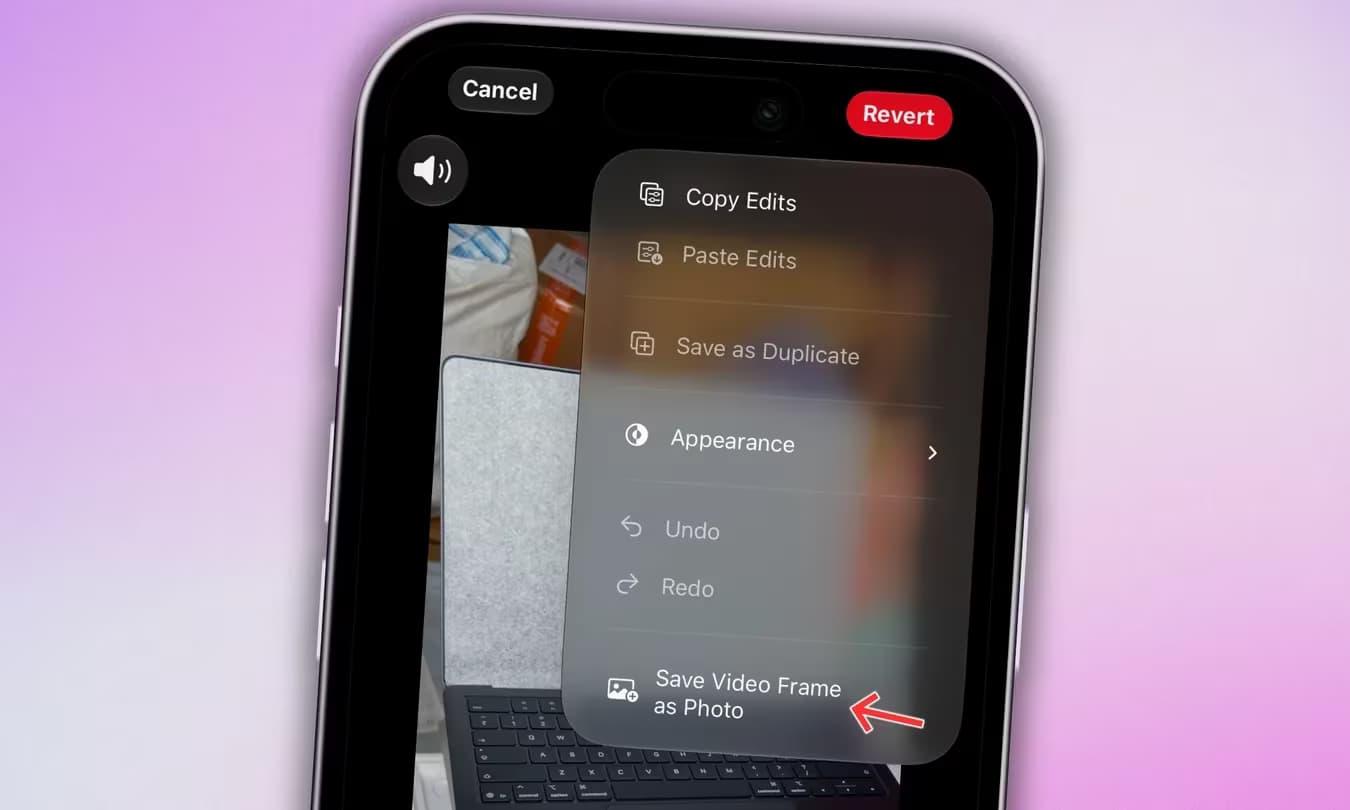
In iOS 27, Apple introduces a new “Save Video Frame as Photo” feature directly in the Photos app, allowing users to capture a high-quality still from any video without screenshots or extra editing.
How the Save Video Frame as Photo feature works in iOS 27
This new option lives within the Photos app’s video playback interface. You can extract and save any video frame as a standalone photo, making the process quick and painless in two ways.

Recommended reading
These 5 iOS 27 tweaks quietly fix daily iPhone annoyances
First, open any video in Photos, scrub to the desired frame, pause, then tap the three-dot menu at the top right and select “Save Video Frame as Photo.” A confirmation banner appears at the bottom, and the saved still joins your photo library alongside the original video.
For more precise frame selection, tap the edit icon during video playback to open the editing timeline. Slide through frames on the bottom timeline, find your exact moment, then use the three-dot menu again to save that frame as a photo.
Why saving video frames beats screenshots in iOS 27
Unlike screenshots, which capture the screen at lower resolution in PNG format and often include unwanted video controls or notifications, saved video frames are extracted as clean photos. For a 4K 60fps video, the resulting image is an 8-megapixel Apple HEIF photo, optimized for quality and size.
This method eliminates the common problems of blurry screenshots and manual cropping. It also avoids capturing distracting UI elements like the playback bar or pop-up alerts, streamlining your workflow and delivering cleaner results right out of the gate.
Though Apple didn’t highlight this feature at WWDC, it stands out as a genuinely useful improvement in iOS 27.
For international users unfamiliar with the nuances, Apple’s move mirrors features some Android manufacturers and third-party apps have offered, but this native implementation promises smoother integration and better results, especially benefiting those who shoot a lot of video for social media or memories.
As video and photo convergence becomes more important, this feature marks a notable step forward by making frame capture intuitive, high-quality, and hassle-free. Expect other platforms to follow suit as users demand easier ways to grab moments from moving images.

Gadgets Editor
Eli is obsessed with the tangible future. He reviews phones, wearables, and everything with a battery. Known for his rigorous testing protocols and unabashed teardowns, Eli has broken more review units than he cares to admit, all in the name of discovering the truth about durability and repairability.