• 3 min read
Self-hosted Umami now tracks iOS apps too
A lightweight Swift package lets iOS apps send analytics to a self-hosted Umami instance without IDFA, third-party SDKs, or stored identifiers.
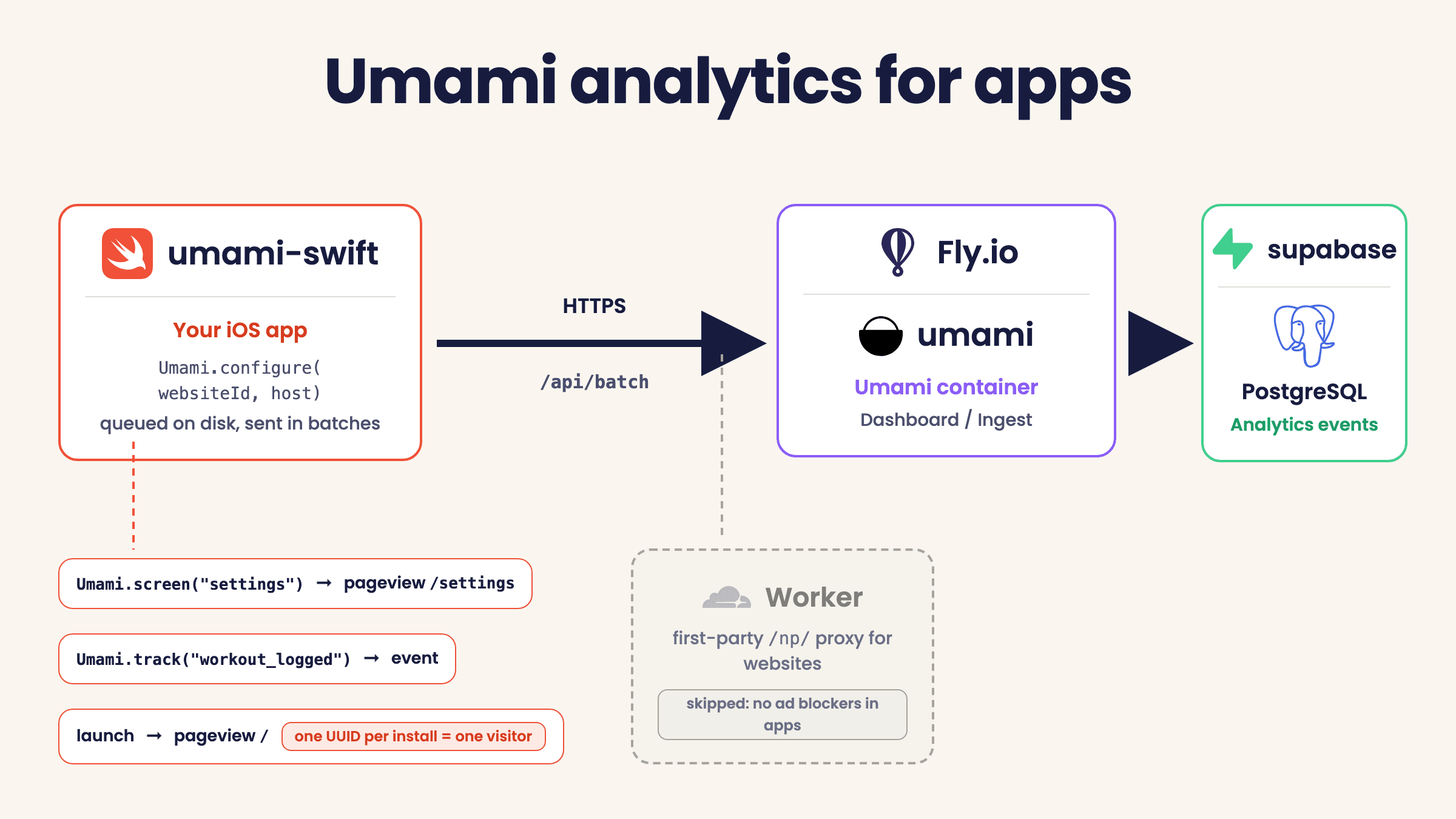
Image: Hacker News
A self-hosted Umami setup built for websites can also handle iOS app analytics with surprisingly little extra work. In a post published July 14, 2026, Hjerpbakk says he built an open source Swift package called umami-swift to bring app analytics into the same dashboard he already uses for the web, without a heavyweight SDK, an IDFA prompt, or a third party collecting data.
The idea is simple: each app is registered in Umami as if it were a website, using a stable pseudo-domain such as myapp.ios. That makes the app appear alongside real sites in the Umami dashboard, with the same core metrics: visitors, visits, and views. Individual app screens can be reported as pages, so sections like settings, summaries, or logging flows show up in Umami’s pages list.
The package itself is intentionally minimal. It has no dependencies, and its API centers on four calls:
Recommended reading
Chrome’s Gemini tools reach UK desktop users
- Umami.configure(…) at launch
- Umami.track(…) for named events
- Umami.screen(…) for pageview-style screen tracking
- Umami.setEnabled(false) for opt-out
According to the post, configure also queues a launch pageview and an app_started event automatically. Events are queued to disk and sent in batches, so launches without network access are not lost and the UI does not block on analytics delivery.
How Umami handles app traffic
Hjerpbakk notes that Umami’s tracking script already talks to /api/send and /api/batch, both of which accept JSON and identify the target by website-id in the payload rather than an API key. That means a native Swift client can send the same payload shape directly.
For identity, umami-swift supplies its own visitor ID. Each event includes payload.id, a random UUID that lives only in memory and rotates when the calendar day changes. Nothing is written to the device, Hjerpbakk says, so there is no persistent identifier to recover later and usage cannot be linked across days, apps, or installs. In practice, because the ID disappears when the process ends, each launch usually counts as a new visitor.
That design also avoids App Tracking Transparency and does not touch IDFA.
Why pageviews matter, and why apps skip the proxy
A key implementation detail is that Umami calculates its overview metrics from pageviews, not custom events alone. So the client sends a pageview for / on every launch and whenever the app returns to the foreground. Additional screens can be sent as paths like /settings, which is what populates the dashboard’s pages list.
Unlike websites, the app does not need to route tracking through the author’s Cloudflare Worker at /np/. Hjerpbakk says common iOS content blockers only apply inside Safari, while native app traffic is generally only visible to system-wide VPN or DNS blockers. In those cases, the domain is exposed, but not the request path inside the encrypted HTTPS payload. Because his self-hosted Umami instance runs on hjerpbakk-analytics.fly.dev, an unremarkable hostname not on block lists, the app can send data straight to the Fly origin.
The Cloudflare Worker still serves one purpose: dashboard icons. Umami can be configured with FAVICON_URL=https://hjerpbakk.com/icons/{{domain}}, letting the Worker return real app icons for pseudo-domains like simplestworkouttracker.ios while redirecting ordinary websites to DuckDuckGo’s favicon service. It is a cosmetic tweak, but one that makes app entries in the website list look like first-class citizens.

Computing Editor
Tomas lives in the terminal. He covers chips, laptops, and operating systems with a focus on performance and efficiency. He reads kernel changelogs the way other people read fiction, and he's always on the hunt for the perfect mechanical keyboard switch. If it processes data, Tomas has an opinion on it.
via Hacker News